Self Assigned Reviews
Self Assigned Reviews
Section titled “Self Assigned Reviews”Self assigned reviews are disabled by default in the platform. Users should not be attesting to their own access, as this creates a conflict of interest and undermines the integrity of the access review process.
When a user is assigned as a reviewer for their own access, these reviews will typically end up in the Unassigned Reviews section.
Assigning a Reviewee as Their Own Reviewer
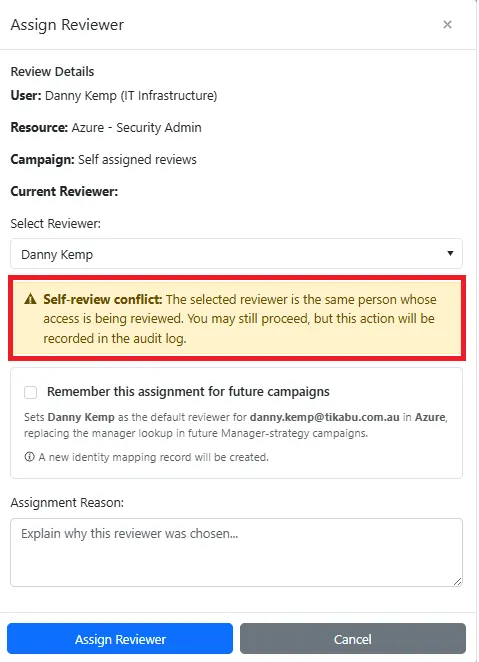
Section titled “Assigning a Reviewee as Their Own Reviewer”While not recommended, you can assign a reviewee as a reviewer for their own access. However, you must acknowledge the following warning:
Self-review conflict: The selected reviewer is the same person whose access is being reviewed. You may still proceed, but this action will be recorded in the audit log.
By proceeding with a self-assigned review, you acknowledge that:
- The action violates standard access review best practices
- The decision will be logged in the audit trail for compliance purposes
- This may not meet regulatory or compliance requirements for your organization
Best Practices
Section titled “Best Practices”To maintain proper segregation of duties:
- Assign reviews to direct managers or appropriate business owners
- Use the Reassigning Review Items feature to correct any incorrectly assigned reviews
- Monitor the Unassigned Reviews section regularly to identify and address self-assigned reviews
Screenshot
Section titled “Screenshot”