Entra ID Groups
Entra ID Groups
Section titled “Entra ID Groups”It is possible to create a role based on Entra ID Groups names that have already been synced into the platform. This allows you to leverage your existing identity provider groups for role-based access management.
Creating a Role Based on Entra ID Groups
Section titled “Creating a Role Based on Entra ID Groups”Follow these steps to create a role using an existing Entra ID Group:
- Navigate to Roles in the platform
- Click on the Create Role button (blue button)
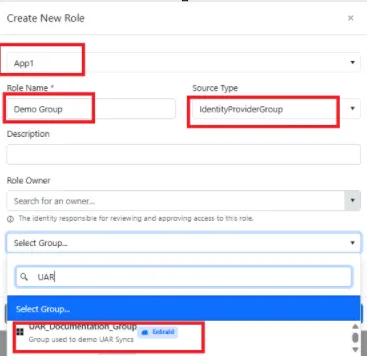
- Complete the required details:
- Application: Choose an existing application from the dropdown
- Role Name: Enter a descriptive name for the role
- Source Type: Select IdentityProviderGroup from the options
- Click on Select Group… to choose an existing Entra ID Group
- Click Save to create the role
Syncing Members
Section titled “Syncing Members”Once the role has been created:
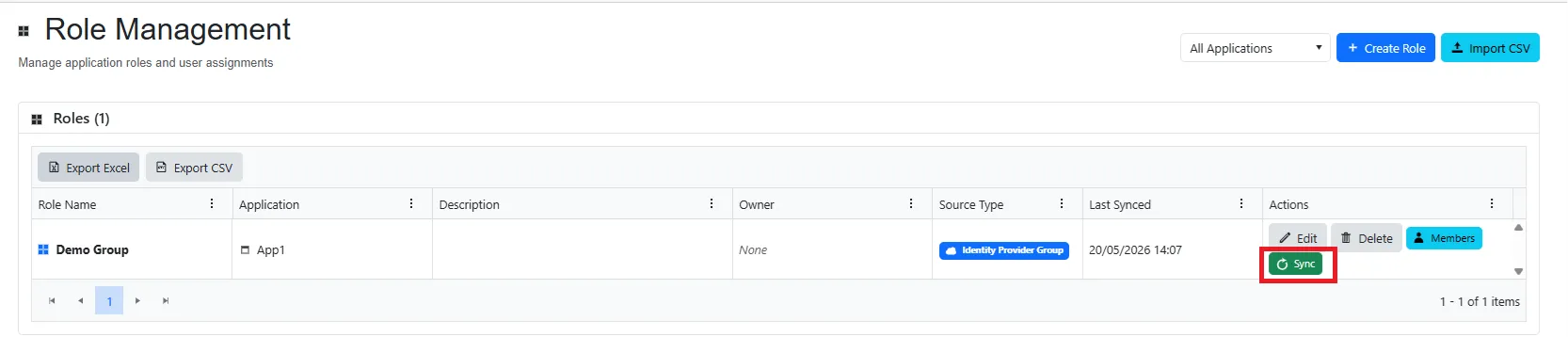
- Click on the green Sync button to run a live sync
- Click on Members to view the synced members from the Entra ID Group
This will display all users who are members of the selected Entra ID Group and have been synchronized into the platform.