
Azure Application Permission
Azure Application Permission
Section titled “Azure Application Permission”Step 1: Log in as Global Admin or Application Administrator
Section titled “Step 1: Log in as Global Admin or Application Administrator”Ensure you have Global Administrator or Application Administrator rights.
Step 2: Open the Admin Consent URL
Section titled “Step 2: Open the Admin Consent URL”We have provided you with a secure admin consent link for the application:
👉 https://companyname.tikabu.io
Clicking this link will:
- Open the Microsoft permissions request screen.
- Display the permissions that the application requires.
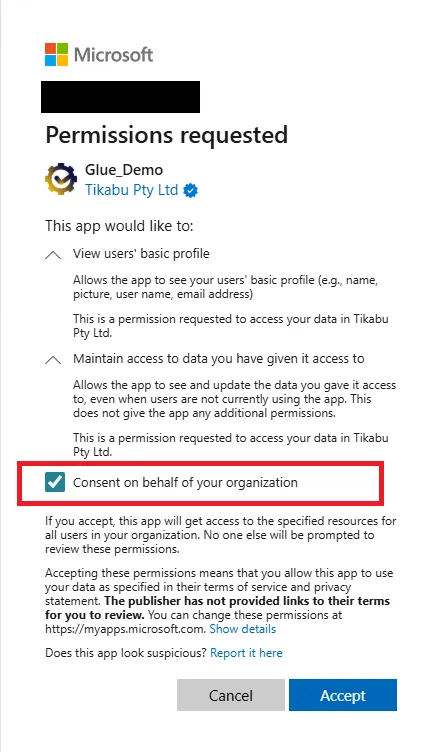
Step 3: Review and Grant Consent
Section titled “Step 3: Review and Grant Consent”- Review the listed permissions.
- Click Accept to grant consent on behalf of your organisation.
- Ensure that you check the option “Consent on behalf of your organisation” (if prompted).